Azure AI Search
The Azure AI Proxy provides pass-through access to Azure AI Search indexes. This lets workshop attendees query search indexes behind the same API-key authentication used for all other proxy endpoints, without revealing backend service URLs or admin keys.
How It Works
(Python SDK, REST)"] Proxy["Azure AI Proxy
authenticates & forwards"] Search["Azure AI Search
Service"] Client -- "api-key (attendee key)
POST /api/v1/indexes/{index}/docs/search" --> Proxy Proxy -- "api-key (query key) or
Bearer token (managed identity)" --> Search Search -- "search results" --> Proxy Proxy -- "search results" --> Client
- Client sends a search request to
https://<proxy-host>/api/v1/indexes/{indexName}/docs/searchwith anapi-keyheader containing the attendee's proxy API key. - Proxy validates the attendee API key, looks up the search catalog entry for the event, and forwards the request to the registered Azure AI Search service.
- Azure AI Search receives the request authenticated with either the backend query API key (
api-keyheader) or a managed identity Bearer token. - Proxy returns the search results unchanged to the client.
Supported URL patterns
| Pattern | Description |
|---|---|
POST /api/v1/indexes/{indexName}/docs/search |
Standard REST search query |
POST /api/v1/indexes('{indexName}')/docs/search.post.search |
OData-style POST search |
Authentication
The proxy supports two backend authentication modes for Azure AI Search:
| Mode | Header sent to Search service |
|---|---|
| API Key (default) | api-key: <query-api-key> |
| Managed Identity | Authorization: Bearer <token> (scope: https://cognitiveservices.azure.com/.default) |
The proxy never forwards the client's attendee API key to the backend. It replaces it with the catalog's endpoint key or a managed identity token.
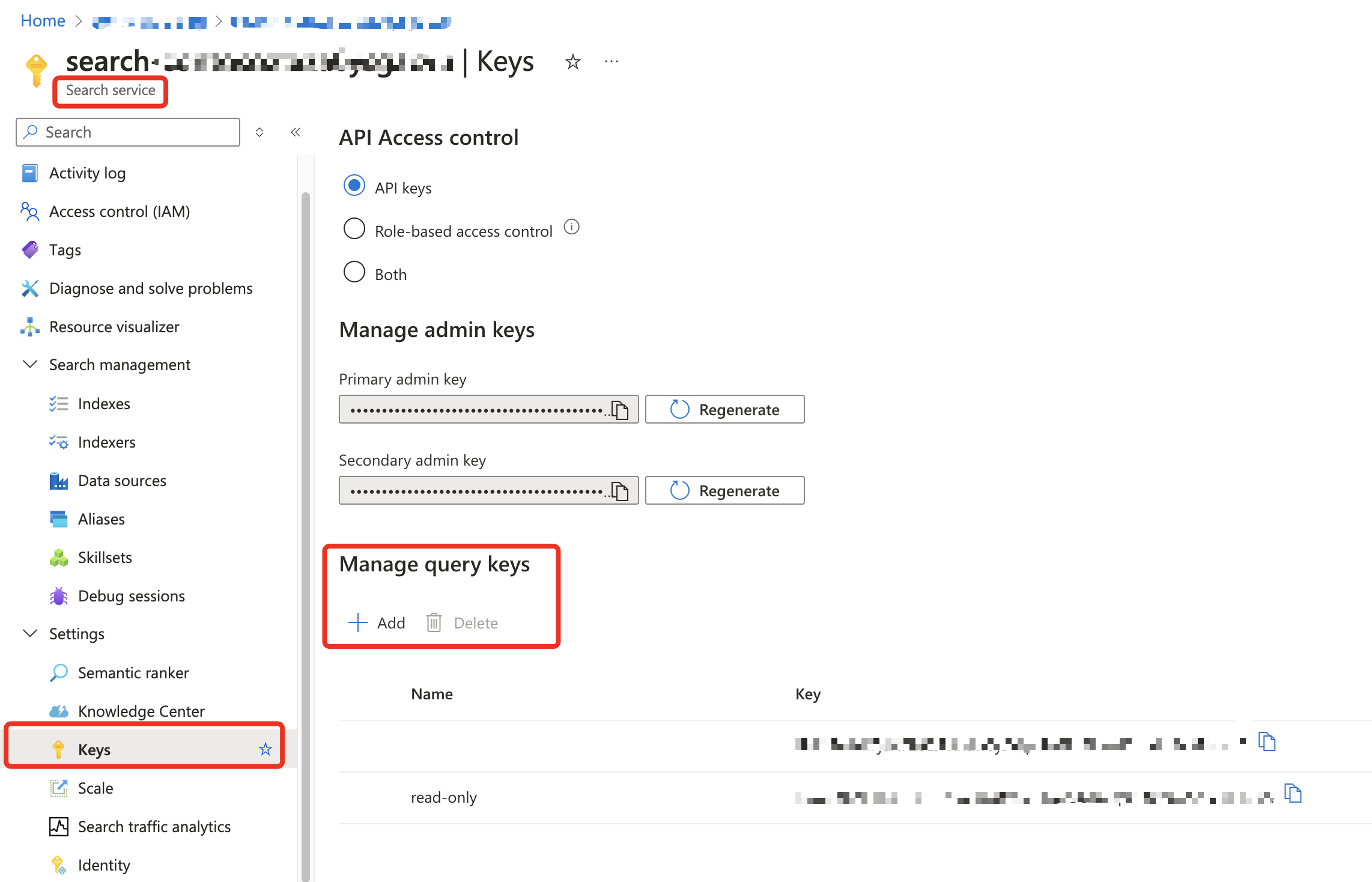
Step 1: Create an Azure AI Search Query Key
For security, use a read-only Query API Key rather than an Admin key. A query key allows search queries but cannot modify indexes or data.
- In the Azure portal, navigate to your Azure AI Search service.
- Go to Settings → Keys.
- Copy an existing Query key, or create a new one.
Step 2: Register the Search Service in the Proxy Admin UI
- Log in to the proxy admin UI.
- Go to Resources → + New Resource.
-
Fill in the fields:
Field Value Example Friendly Name A human-readable label Product Search IndexDeployment Name The Azure Search index name contoso-productsType Select Azure AI Search Endpoint URL The Search service endpoint https://mysearch.search.windows.netKey The read-only Query API key The query key from Step 1 Use Managed Identity Toggle on for token-based auth Region Any label eastusActive Checked -
Link the catalog to an event: Edit the event and add the new Azure AI Search catalog so attendees can access it.
Note
The Deployment Name must match the Azure Search index name exactly. This is what clients use in the URL path: /api/v1/indexes/{indexName}/docs/search.
Tip
If using Managed Identity, you can leave the Key field empty. The proxy will authenticate with a Bearer token instead. See the Managed Identity guide for RBAC setup.
Step 3: Query from a Client
Python SDK
Use the standard Azure AI Search Python SDK — just point the endpoint at the proxy and use the attendee API key as the credential:
import os
from azure.search.documents import SearchClient
from azure.core.credentials import AzureKeyCredential
from azure.search.documents.models import VectorizedQuery

PROXY_ENDPOINT = os.environ["PROXY_ENDPOINT"]  # e.g. https://<proxy-host>/api/v1
API_KEY = os.environ["PROXY_API_KEY"]           # attendee API key
INDEX_NAME = "contoso-products"                 # matches the Deployment Name in the catalog

search_client = SearchClient(
    endpoint=PROXY_ENDPOINT,
    index_name=INDEX_NAME,
    credential=AzureKeyCredential(API_KEY),
)

# Keyword + vector hybrid search with semantic ranking
vector_query = VectorizedQuery(
    vector=embedding,  # your embedding vector
    k_nearest_neighbors=3,
    fields="contentVector",
)

results = search_client.search(
    search_text="wireless headphones",
    vector_queries=[vector_query],
    query_type="semantic",
    semantic_configuration_name="default",
    top=3,
)

for doc in results:
    print(f"{doc['title']} (score: {doc['@search.score']:.2f})")
curl
curl -X POST "https://<proxy-host>/api/v1/indexes/contoso-products/docs/search" \
  -H "api-key: <your-attendee-api-key>" \
  -H "Content-Type: application/json" \
  -d '{
    "search": "wireless headphones",
    "top": 5,
    "select": "id, title, content"
  }'
Troubleshooting
| Issue | Check |
|---|---|
401 Unauthorized from proxy |
Verify your api-key header matches a valid, active attendee key for an active event |
404 Not Found from proxy |
Verify the index name in the URL matches the Deployment Name in the catalog, and the catalog is linked to your event |
403 Forbidden from Search |
The catalog's Key doesn't have query permissions, or managed identity RBAC is not configured |
400 Bad Request from Search |
Check the request body matches the Azure AI Search REST API format |
| Empty results | Verify the index name, field names, and semantic configuration match your search service |