Developer support
The Azure AI Proxy is a transparent proxy that supports several Azure AI SDKs including Azure OpenAI SDKs, Azure AI Search SDKs, Azure AI Foundry Agent Service SDKs, REST calls, as well as libraries like LangChain. Access is granted using a time bound API Key and the Azure AI Proxy endpoint URL.
Azure AI Proxy SDK access
For SDK access to Azure AI Proxy services, you need two things:
- The Azure AI Proxy endpoint URL. The endpoint URL is prefixed with /api/v1, for example
https://YOUR_PROXY_URL/api/v1. - A time bound API Key obtained from the event registration page.
The Azure AI Proxy service URL is provided by the event organizer. The time bound API Key is provided to the attendees when they register for the event.
Supported APIs
The Azure AI Proxy supports the following APIs:
| API | Endpoint Pattern | Description |
|---|---|---|
| Chat Completions | /api/v1/openai/deployments/{deploymentName}/chat/completions |
Azure OpenAI chat completions (streaming supported) |
| Chat with Extensions | /api/v1/openai/deployments/{deploymentName}/extensions/chat/completions |
Azure OpenAI chat completions with extensions |
| Embeddings | /api/v1/openai/deployments/{deploymentName}/embeddings |
Azure OpenAI text embeddings |
| Azure Inference Chat | /api/v1/chat/completions |
Azure Inference (Mistral-compatible) chat completions |
| Azure Inference Embeddings | /api/v1/embeddings |
Azure Inference text embeddings |
| Image Embeddings | /api/v1/images/embeddings |
Azure Inference image embeddings |
| Azure Inference Info | /api/v1/info |
Azure AI Model Inference model metadata |
| Azure AI Search | /api/v1/indexes/{indexName}/docs/search |
Azure AI Search queries |
| Foundry Agents | /api/v1/agents, /api/v1/assistants, /api/v1/threads, /api/v1/files |
Azure AI Foundry Agent Service operations |
| Foundry Conversations | /api/v1/openai/v1/conversations |
Azure AI Foundry conversation management |
| Foundry Responses | /api/v1/openai/v1/responses |
Azure AI Foundry response management |
| MCP Server | /api/v1/mcp/{deploymentName}/{path} |
Model Context Protocol server passthrough |
Azure OpenAI SDKs
The Azure AI Proxy provides support for the following Azure OpenAI SDKs:
- Azure OpenAI Chat Completions (including streaming)
- Azure OpenAI Chat Completions with Extensions
- Azure OpenAI Embeddings
Azure OpenAI Python SDK example
The following is an example of calling the Azure OpenAI Chat Completions API using the Azure OpenAI Python SDK.
""" Test Azure OpenAI Chat Completions API """

import os

from dotenv import load_dotenv
from openai import AzureOpenAI

load_dotenv()

ENDPOINT_URL = os.environ.get("ENDPOINT_URL")
API_KEY = os.environ.get("API_KEY")
API_VERSION = "2025-01-01-preview"
MODEL_NAME = "gpt-4.1-mini"


client = AzureOpenAI(
    azure_endpoint=ENDPOINT_URL,
    api_key=API_KEY,
    api_version=API_VERSION,
)

MESSAGES = [
    {"role": "system", "content": "You are a helpful assistant."},
    {"role": "user", "content": "Who won the world series in 2020?"},
    {
        "role": "assistant",
        "content": "The Los Angeles Dodgers won the World Series in 2020.",
    },
    {"role": "user", "content": "Where was it played?"},
]


completion = client.chat.completions.create(
    model=MODEL_NAME,
    messages=MESSAGES,
)

print(completion.model_dump_json(indent=2))
print()
print(completion.choices[0].message.content)
Azure AI Foundry Agent Service
The Azure AI Proxy supports pass-through access to the Azure AI Foundry Agent Service. This includes operations for agents, assistants, threads, files, conversations, and responses.
Note
Foundry Agent resources require Managed Identity authentication. See the Managed Identity guide for setup instructions.
The proxy tracks object ownership so that each attendee can only access the agents, threads, files, and other objects they created.
MCP Server
The Azure AI Proxy supports pass-through access to MCP (Model Context Protocol) Servers. Configure an MCP Server resource in the admin portal, and the proxy will forward requests to the upstream MCP endpoint.
MCP Server requests are routed via /api/v1/mcp/{deploymentName}/{path}.
Azure AI Search Query
The Azure AI Proxy provides support for Azure AI Search queries. Access to these services is granted using a time bound event code. The proxy supports Azure AI Search POST REST and POST ODATA queries.
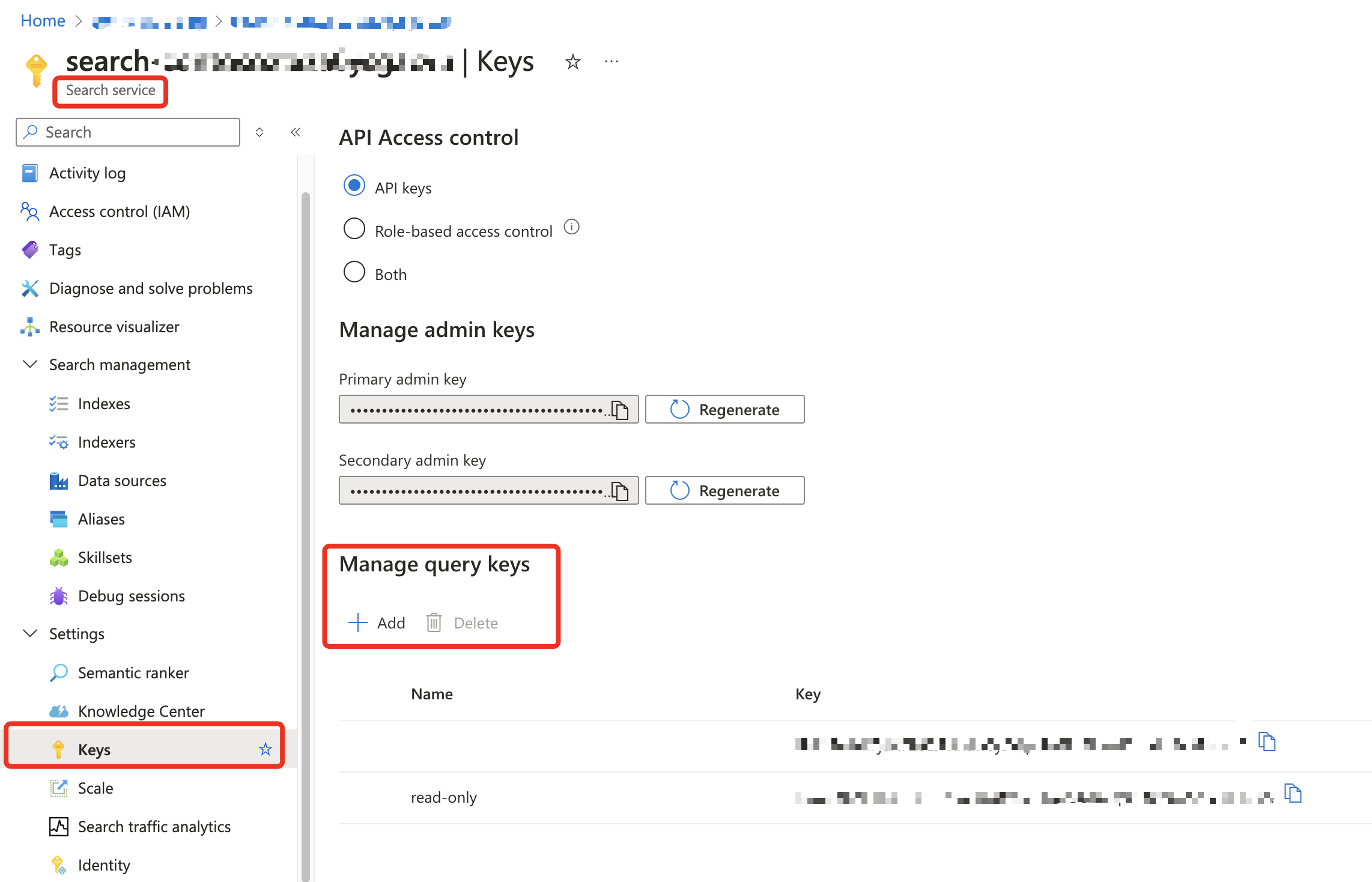
Create a read-only Query API Key for the Azure AI Search service and use it with the Azure AI Proxy service.
Azure AI Search Python SDK example
The following is an example of calling the Azure AI Search API using the Azure AI Search Python SDK.
""" Test Azure AI Search API """

import os
from dotenv import load_dotenv
from azure.search.documents import SearchClient
from azure.core.credentials import AzureKeyCredential
from azure.search.documents.models import VectorizedQuery

load_dotenv()

ENDPOINT_URL = os.environ.get("ENDPOINT_URL")  # e.g. https://YOUR_PROXY_URL/api/v1
API_KEY = os.environ.get("API_KEY")

def retrieve_documentation(
    question: str,
    index_name: str,
    embedding: list[float],
) -> list[dict]:

    search_client = SearchClient(
        endpoint=ENDPOINT_URL,
        index_name=index_name,
        credential=AzureKeyCredential(API_KEY),
    )

    vector_query = VectorizedQuery(
        vector=embedding, k_nearest_neighbors=3, fields="contentVector"
    )

    results = search_client.search(
        search_text=question,
        vector_queries=[vector_query],
        query_type="semantic",
        semantic_configuration_name="default",
        top=3,
    )

    docs = [
        {
            "id": doc["id"],
            "title": doc["title"],
            "content": doc["content"],
            "url": doc["url"],
        }
        for doc in results
    ]

    return docs